
Register 7KBET – Complete Guide to Account Setup and Security
Register 7KBET is the first step toward creating a personal account using a phone number, password, and basic registration details. New players in Brazil can follow the account registration process to understand each required field and prepare for any additional verification. At 7KBET, providing accurate personal information and setting up proper security measures from the beginning helps members manage their accounts more safely and conveniently.

How to Register 7KBET in Just 10 Seconds
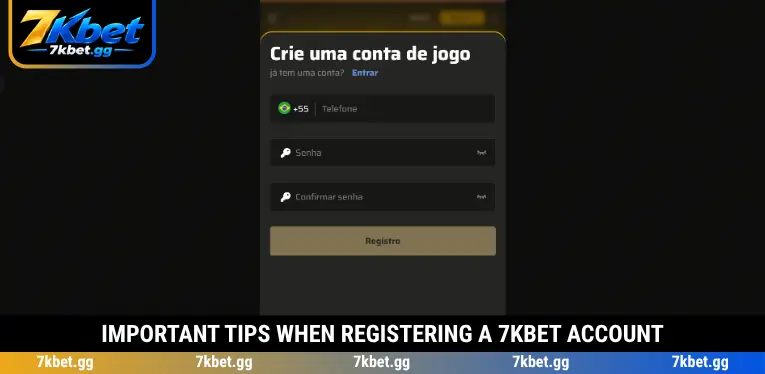
The Register 7KBET process uses a straightforward form containing three main fields: phone number, password, and password confirmation. 7KBET provides the following four-step account registration guide to help users in Brazil enter the necessary information, submit their details, and check whether their new accounts have been created successfully.
Step 1 – Visit the Homepage and Select Registro
Open the 7KBET homepage using a mobile browser or computer, then locate the Registro button in the upper-right corner of the main interface. Select this option to open the registration form labeled “Crie uma conta de jogo” in Portuguese. Make sure to distinguish Registro, which is used to create a new account, from Entrar, which allows existing members to access their accounts using previously registered credentials.
Step 2 – Enter Your Phone Number Correctly
On the Register 7KBET form, locate the Telefone field and enter an active personal phone number. The reference interface displays Brazil’s +55 country code, so users should verify that their numbers follow the required format before proceeding. 7KBET recommends registering with a phone number under your own control, as accurate contact information may be necessary for identity verification, customer support, or account recovery.
Step 3 – Create and Confirm Your Login Password
Enter a new password in the Senha field, following any length or character requirements displayed on the registration form. Repeat the same password in the Confirmar senha field to ensure both entries match exactly and prevent interruptions during Register 7KBET. For better account protection, choose a strong password containing different character types when supported, and avoid predictable combinations such as birthdays, phone numbers, or credentials already used on other platforms.
Step 4 – Submit the Form to Complete Registration
Review your phone number and both password fields carefully before clicking the Registro button at the bottom of the form. If 7KBET requires additional verification, follow the instructions displayed on the screen before accessing the member dashboard. Once registration is successful, check whether you can log in normally and store your credentials securely. Never share your password or verification information with anyone else.
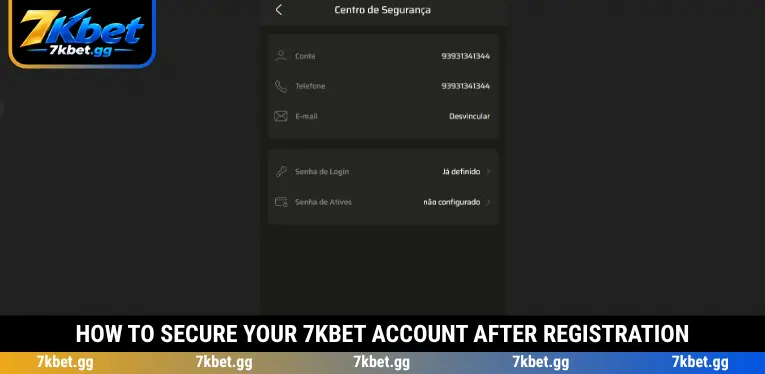
How to Secure Your 7KBET Account After Registration
After completing Register 7KBET, members should check the Centro de Segurança section to review account information and available security settings. The reference interface includes account details, registered phone numbers, email management, and separate password options. 7KBET recommends reviewing the following settings to help protect personal information and maintain secure access.
- Verify your account information: Open the Conta section to review the details associated with your registered account. If any information appears incorrect, contact customer support rather than sharing sensitive details with unauthorized third parties.
- Confirm your phone number: Check the Telefone section to ensure the registered number is accurate and remains accessible. Keeping an active phone number can make identity verification and account recovery easier when additional confirmation is required.
- Link your email address: Review the E-mail section and complete email linking if the feature is available and your account has not yet been connected. Use a personal email address protected by a strong password to reduce unauthorized access risks.
- Protect your login password: The Senha de Login setting manages the password used to access your account. Avoid saving credentials on shared devices and change your password immediately if you notice suspicious account activity.
- Set up an asset password: Check Senha de Ativos to determine whether a separate password for asset-related functions has been configured. If supported, create a password different from your login credentials and keep it private to strengthen account protection.
Common Register 7KBET Problems and How to Fix Them
During Register 7KBET, users may encounter errors involving phone number formats, password confirmation, or network connectivity. 7KBET recommends checking the displayed error message before submitting the form again, as repeated attempts without correcting the underlying issue may cause unnecessary interruptions. The following table outlines common registration problems and practical solutions.
| Common Problem | How to Fix It |
| Invalid phone number | Check Brazil’s +55 country code and enter your phone number in the format required by the registration form. Remove unnecessary spaces or unsupported characters if the system rejects the entry. |
| Phone number already registered | Check whether your number is already associated with an existing account. If so, use the login or account recovery feature instead of attempting to create another account with the same information. |
| Passwords do not match | Re-enter your password in both the Senha and Confirmar senha fields. Check capitalization, special characters, and accidental spaces, and use the password visibility option if available. |
| Password does not meet requirements | Review the password length and character requirements shown on the screen. Adjust your password accordingly, avoiding simple combinations that may fail the platform’s security validation. |
| Registro button does not respond | Confirm that all required fields are complete and check your internet connection. If the button remains unresponsive, refresh the page once and look for any maintenance or system notifications. |
| Verification code not received | Confirm that the registered phone number is correct and your mobile network is working. Request another code only after the permitted waiting period, and contact support if the issue continues. |
| Unable to log in after registration | Check whether the account creation process was completed successfully, then enter your login credentials again. If your account requires activation or additional verification, contact customer support for assistance. |
Important Tips When Registering a 7KBET Account
Before starting Register 7KBET, players should verify their personal information, understand the eligibility requirements, and ensure their devices are secure. 7KBET recommends following these precautions to protect sensitive data, reduce registration problems, and maintain responsible account management when accessing online gaming services.
- Meet the age requirements: Applicants must be at least 18 years old and comply with applicable legal requirements in Brazil. Never use another person’s identity or provide false information to bypass registration and verification procedures.
- Access the correct platform: Verify the website address and official branding before entering your phone number or password. Avoid registration pages shared through unfamiliar sources, as fraudulent websites may attempt to collect sensitive information.
- Provide accurate personal details: Your phone number and other registration information should belong to you and remain valid. Inconsistent information can create difficulties during identity verification, account recovery, or future customer support requests.
- Keep security credentials private: Never share login passwords, asset passwords, or verification codes with other individuals. If you suspect unauthorized access, update your security settings promptly and contact the appropriate support team.
- Manage your entertainment budget: Completing Register 7KBET does not mean you must immediately deposit funds or place bets. Establish a personal spending limit, understand the financial risks of gambling, and never treat betting activities as a guaranteed source of income.
Conclusion
Register 7KBET helps new users understand how to enter their phone numbers, create secure passwords, and submit registration details through the reference interface. Reviewing account information and applying proper security settings can reduce common registration problems. 7KBET recommends using valid personal details, completing any required verification, and setting responsible spending limits before participating in betting activities.